Playing Wheelie Bike on a School Chromebook: Controls, Saves and Fixes
Published · 2 min read
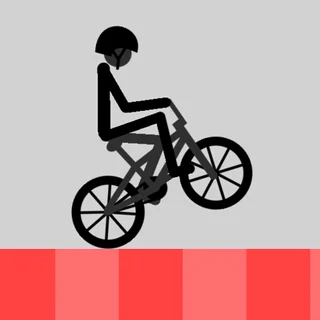
Wheelie Bike is a small HTML5 game, and wheeliebike.org serves it straight from its own domain. That makes it easy to play on a school Chromebook, a laptop or a phone. Here is what loads, how the controls work, where your best distance is kept and what to do if something does not respond.
What loads when you press Play
The game was made with Construct 2, a tool for 2D browser games. When you open the page, it loads a handful of files from wheeliebike.org: the game engine, the game's own data and a set of small images — the rider, the bike parts, the road and the buttons. There is no plugin, no installer and no account. The game is drawn in landscape and scales to the size of the player; the full-screen button under it gives you the biggest view.
Mouse and touch only
This surprises people: Wheelie Bike does not use the keyboard. Arrow keys and the space bar do nothing. The only input is a press — the left mouse button on a computer, a finger on a phone or tablet.
- Press and hold to pedal and lift the front wheel.
- Release to let the front wheel come down.
- The round Play button starts the game and the rotating blue arrow restarts after a crash.
On a Chromebook trackpad, a click-and-hold works but it is harder to keep a steady rhythm. If you can, plug in a mouse. Tapping the trackpad with two fingers is a right-click and does nothing in the game.
Where your progress is saved
Wheelie Bike keeps two numbers in your browser's local storage: your best distance (the trophy, bottom left) and the number of crashes (the skull, bottom right). It also uses the best distance to draw the yellow best line on the road. In practice:
- The same browser on the same device remembers both numbers.
- Another device, another browser or another Chrome profile starts at zero.
- Incognito windows, guest mode and clearing site data wipe them.
There is no cloud save and no sign-in. On a shared school computer the trophy may already show somebody else's record — which is a good target.
Sound
Wheelie Bike has no music and no sound effects, so it is quiet in class by design. If you hear sound, it is coming from another tab.
If it does not respond
If pressing does nothing, click once inside the game frame first; the page needs to know the game is what you are pressing on. If the rider stutters, close tabs that are playing video and turn off battery saver: a balance game needs smooth frames, and a skipped frame at the wrong moment ends the wheelie. Reloading the page is safe — your best distance is kept.
Is it blocked at school?
The game is an ordinary web page on wheeliebike.org with nothing to download, so it opens wherever normal websites open. If your school's filter blocks the site, only the network's administrator can change that.
Back on the bike: play Wheelie Bike, or read how to hold a longer wheelie.
More from the blog
- How to Hold a Longer Wheelie in Wheelie Bike
What the single button really does, why one long hold always ends upside down, and the pulse-and-pause rhythm that keeps the front wheel hovering past your best line.